

Agree which source scheduling can trust
Identify the approved request record and the person responsible for keeping it current. Scheduling should know where to find the evidenced administrative state and how to ask about an unclear response.
A copied calendar note may lose the conditions or scope of a decision. Preserve the detailed payer and clinical information in the authorized systems and communicate only the approved operational status through the agreed route.
Separate the states that change the next task
Information gathering, submission, a request for more information and a written decision mean different things for the coordinator. Give each state a clear owner and next action.
Receipt is not approval, and a decision may still need qualified interpretation. Do not let an administrative tracker decide clinical urgency or whether care proceeds; those decisions follow the practice’s clinical process and applicable requirements.

Move from the question to the next action
Route the unanswered question by expertise
A missing practice field can belong with administration, while clinical support belongs with the designated clinician. Make the request specific and retain the source question.
If a payer route is unclear, confirm the applicable product and service instructions directly. AHCA resources are relevant for Florida Medicaid program questions; CMS authorization references have their own defined scope and should not be generalized to every plan.
Test the cross-team update
Use a fictional request that changes after scheduling’s initial review. Confirm who sends the update, who receives it and how the remaining dependency is recorded. Include a backup route for an unavailable recipient.
This test can reveal whether a status is technically updated but invisible to the person who relies on it. Record the improvement as a process task with an owner and review date.
Confirm the remote-support arrangement
The free enrollment and authorization register provides a PHI-free view of administrative task ownership and outcomes. It does not replace the actual authorization record or validate a payer decision.
Orlando practices can discuss scheduling handoffs, systems and service fit with SBS in Jacksonville before agreeing remote support. No Orlando office, payer approval authority or guaranteed response time is represented by this guide.
Illustrative workflow
A practical example.
Fictional Orlando workflow: scheduling sees a submitted status while the request team has received a new information question. The practice names the update sender and scheduling recipient, then tests that route with a fictional case. The coordinator tracks the administrative response; the clinician handles the clinical question. Scheduling receives the accurate state and escalation contact rather than an assumed approval.
Put it into practice
- Use one approved status source.
- Communicate the actual remaining dependency to scheduling.
- Test the update and backup route with a fictional request.
Inside the workbook
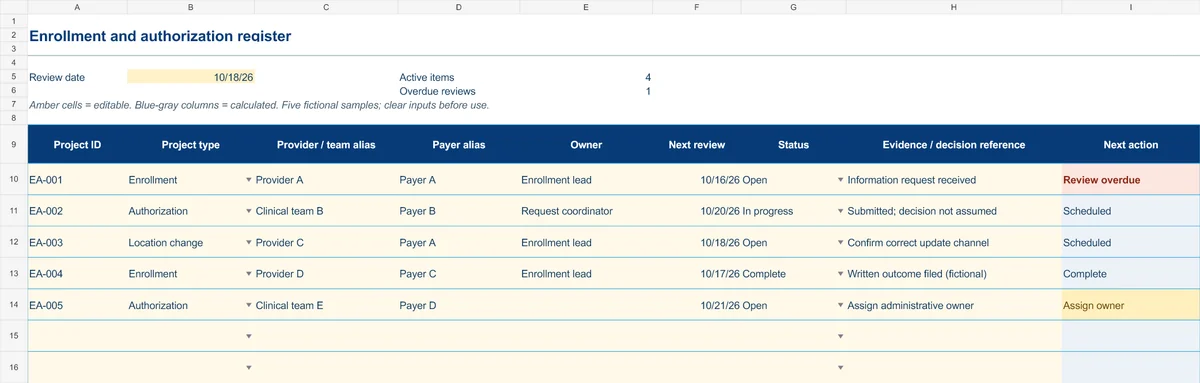
Start with the Instructions tab. Replace the five fictional samples, set your review date and keep the formula columns intact.
Free XLSX tool · No signup
Enrollment & authorization register
Track administrative projects from information gathering to a documented outcome.
- Project-type and status dropdowns
- Provider/team aliases and outcome references
- Calculated reminders for ownership and reviews
Use anonymous process tasks. Keep PHI in approved systems. Includes instructions and fictional samples; no macros or live data connection.